Microsoft 365, Entra ID & Azure Security,
Done Right.

For the senior security auditor who needs depth and evidence, and the IT admin suddenly responsible for a tenant they didn't fully configure — 597 checks across Microsoft 365, Entra ID, Intune, Azure, and AI agents, with engineer-authored remediation and AI-generated PowerShell for every finding.

  • AI Agent Blueprint auditing — the only scanner that checks Copilot Agent Identity Blueprints for dangerous scopes like Directory.ReadWrite.All granted to unattended AI agents
  • 170+ engineer-authored fix guides + AI-generated PowerShell — human-written steps and portal links for every finding; press P and AI builds executable .ps1 scripts tailored to your exact tenant
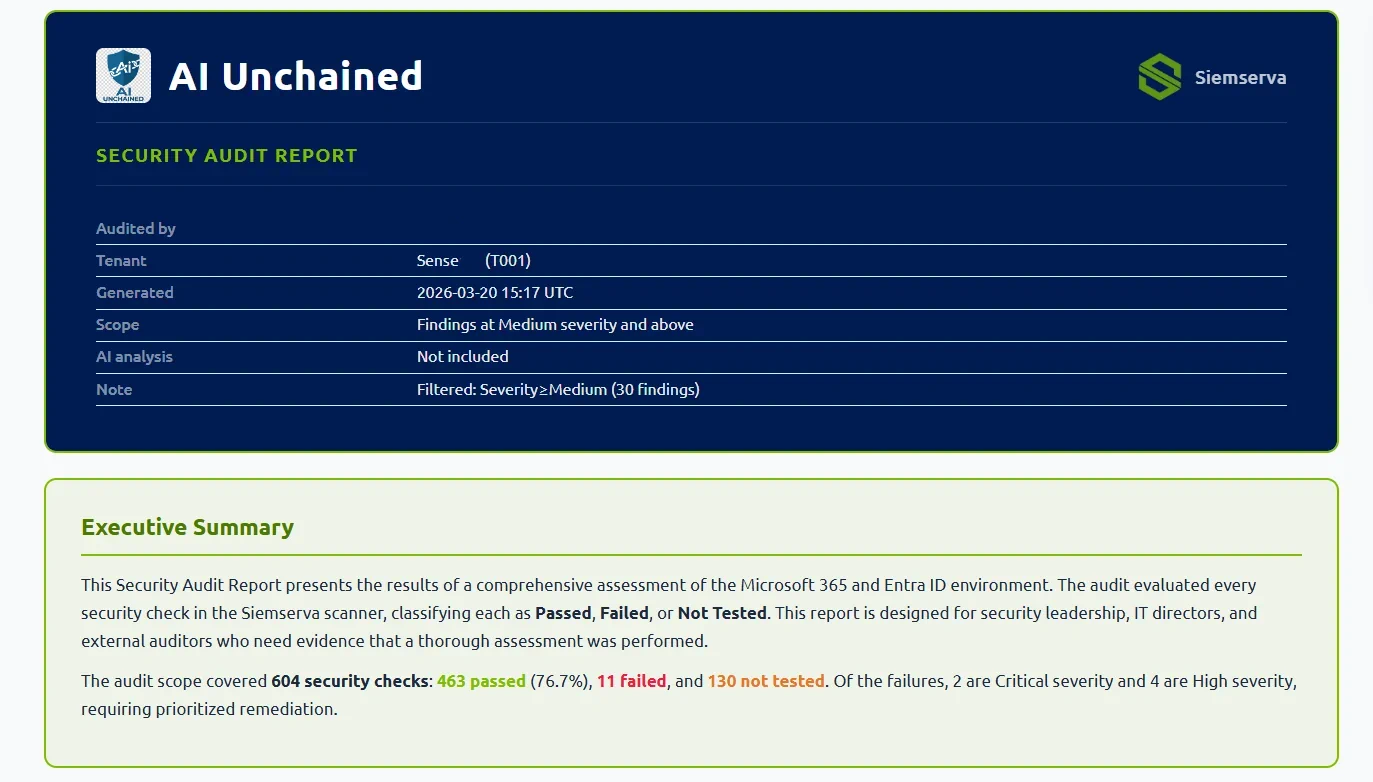
  • Four AI-enhanced report types — Detailed, Compliance (MCSB + SCuBA), Business Focused Review, and Remediation — all self-contained HTML, one keystroke

Your Entra ID Tenant and its Services Have Thousands of Security Settings

Each one is a potential gap an attacker can exploit. Most teams don't have the bandwidth to check them all.

Configuration Drift

Tenants accumulate misconfigurations over time — stale accounts, overly permissive apps, gaps in Conditional Access coverage.

What this looks like in practice
  • A Conditional Access policy was set to Report-Only 18 months ago and never enforced — MFA isn't actually required
  • A service principal created for a project has Global Reader + mail access and no owner
  • 17 accounts disabled in HR are still licensed and have active refresh tokens
  • Legacy auth was never blocked — sign-ins are coming in on POP/IMAP daily
  • A trusted named location includes a /8 subnet covering the entire internet

Incomplete Tools

Microsoft Secure Score and Identity Protection cover pieces of the puzzle, but not the whole picture. Critical gaps slip through.

What the gaps look like
  • Secure Score rewards you for enabling a Conditional Access policy in Report-Only — even though it doesn't enforce anything
  • Identity Protection flags risky users but doesn't tell you whether your Conditional Access policy actually responds to them
  • No native tool checks PIM role assignments against principle of least privilege at scale
  • App registration credential hygiene — expired secrets, long-lived certs, overprivileged permissions — isn't surfaced in any single native view
  • Intune compliance + Conditional Access integration gaps aren't visible from either console alone

Compliance is Manual

Mapping every control to MCSB and SCuBA frameworks is tedious manual work — and mistakes mean failed audits.

What this actually costs you
  • MCSB alone covers 12 domains and 66 controls — each must be mapped to specific tenant settings
  • CISA SCuBA adds another layer of M365-specific requirements across AAD, Teams, Exchange, and SharePoint
  • A manual mapping exercise for one tenant takes a skilled engineer 1–2 days — and is outdated the moment settings change
  • Compliance gaps found during an audit cost 10× more to remediate under time pressure than gaps found proactively
  • Auditors increasingly expect automated, timestamped evidence — not spreadsheets

Teams are Stretched

Small security teams can't manually review every user, device, app, role, and policy across a growing tenant.

The scale of the problem
  • A 500-user tenant can have 200+ app registrations, 50+ role assignments, 300+ devices, and 40+ Conditional Access policies — each a potential risk
  • MSPs managing 50 tenants face this problem at 50× the scale with the same headcount
  • Quarterly manual reviews catch yesterday's problems — attackers move faster than quarterly
  • Without automation, junior staff check easy settings and skip the hard ones — exactly where attackers look first
  • Siemserva scans an entire tenant in minutes and surfaces the 10 things that actually matter

Download at 9 AM.
Know Every Gap by 9:05.

From the senior security engineer running audits across 50 tenants to the IT admin who owns security because someone has to — both deserve the best tool available. Siemserva gives both the same 597 checks, the same AI, and the same depth. The data is identical. What changes is how you use it.

597 checks — broad. 15 domains, every surface, nothing assumed safe.
597 checks — deep. 4 Conditional Access engines, forensic sign-in replay, structural bypass detection.
1
Download One .exe. No modules, no pipeline, no Azure subscription required.
2
Scan 597 checks across identity, devices, apps, Conditional Access, and M365. Done in minutes.
3
Fix Every finding ships with step-by-step guidance and AI-generated PowerShell — scoped to your exact tenant.
4
Verify Scan again. Prove it's fixed. Ship a report to leadership without touching a template.

Built for Every Role on Your Team

Same 597 checks, same AI, same depth — what changes is how you use it.

Security Auditor
  • Query findings directly via SQLite — Python, Power BI, PowerShell, Excel
  • Correlate risk across 50 tenants from one dashboard
  • Generate timestamped compliance evidence packages automatically
  • Deep Conditional Access forensics: replay 14 days of real sign-ins against live policies
Same Tool.
Different
Superpowers.
Same data. Same depth.
Neither compromises.
IT Admin
  • Know every gap in minutes — first scan, no configuration
  • Follow engineer-authored fix guides: exact portal paths, step by step
  • AI generates the PowerShell — review it, run it, done
  • Run again to prove the fix worked and ship a report to leadership

AI-Powered Analysis — Your On-Call Security Analyst

Context-aware AI that understands your findings, explains risk in plain language, and generates production-ready remediation scripts.

Ctrl+R

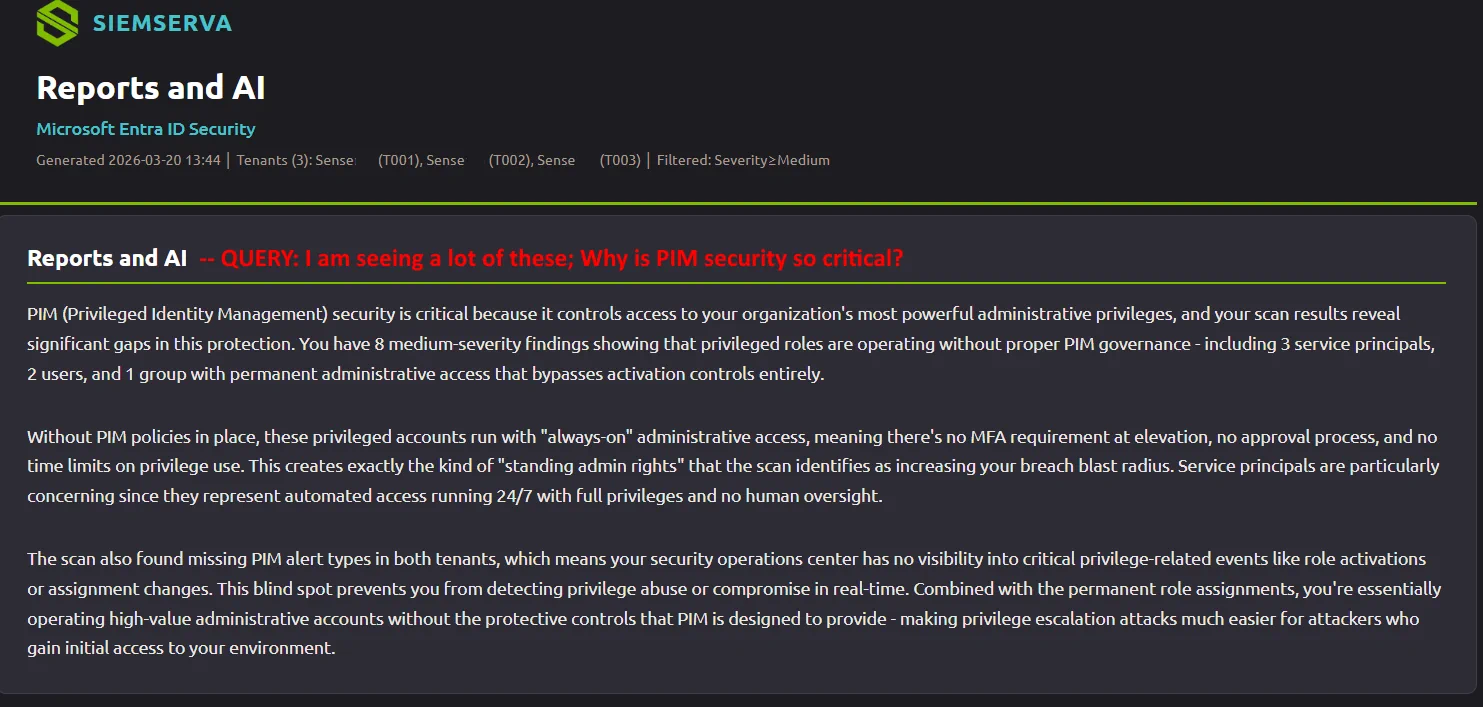
AI Enhanced Reports

The primary AI workflow. Press Ctrl+R for a two-phase picker: choose your report type (1–4), then choose AI mode — quick copy-paste prompt or live streaming via API.

Learn more

Phase 1 selects one of 4 report types. Phase 2 selects AI delivery: press Enter for a ready-to-paste prompt (no API key needed), or press A to stream the analysis live via the Anthropic Claude API (Professional+).

  • 1 — Detailed: Full technical findings report for sysadmins and security engineers
  • 2 — Compliance: MCSB v2 and CISA SCuBA control mapping with pass/fail evidence
  • 3 — Business Focused Review: Executive summary with interactive Sankey flow diagrams
  • 4 — Remediation: Prioritised fix list with PowerShell and portal steps
A

Broad Security Insights

Press A on the Live tab to analyze visible findings. Scroll to different sections for different analysis.

Learn more

The AI reads whatever findings are currently visible in the dashboard and synthesizes a prioritized narrative — which risks matter most, how they relate to each other, and where to start. Scroll to a different domain and press A again for a focused view.

  • Works without an API key via copy-paste mode
  • Or streams live via the Anthropic Claude API
  • Context adjusts automatically to what's on screen
A

Remediation Guidance

In-depth fix instructions with PowerShell commands, portal paths, prerequisites, and implementation order.

Learn more

Select any finding on the Remediation tab and press A to get a full fix plan. The AI considers privilege level, dependencies between settings, and potential side effects — not just "turn this on."

  • Exact Azure portal navigation paths with step counts
  • PowerShell alternatives for every portal action
  • Prerequisites and rollback guidance included
P

PowerShell Script Generation

On the Remediation tab, press P to generate production-ready .ps1 scripts via AI. Uses Microsoft Graph PowerShell SDK with -WhatIf support. Saved to file automatically.

Learn more

Generated scripts are structured for real production use: proper error handling, -WhatIf dry-run support, progress output, and comments explaining each step. Saved automatically to a timestamped file next to your scan data.

  • Uses the Microsoft Graph PowerShell SDK (not REST calls)
  • -WhatIf lets you preview changes before applying them
  • Scripts include prerequisite checks and permission requirements
  • Auto-saved with finding name and date in the filename
A

Error Diagnostics

Root cause analysis for permission gaps, Graph API failures, throttling issues, and step-by-step fixes.

Learn more

When a scan hits an error, press A on that error to get a plain-language diagnosis. The AI identifies whether the issue is a missing permission, a throttled endpoint, a misconfigured app registration, or a tenant policy restriction — and tells you exactly how to resolve it.

  • Identifies missing Graph API permissions by name
  • Distinguishes throttling from auth failures
  • Provides the exact admin consent URL when needed
A

PowerShell for Single Finding

Open any finding's detail panel and press A to generate a production-ready PowerShell remediation script for that specific issue.

Learn more

Each generated .ps1 is scoped to the exact finding — not a generic template. The script uses Microsoft Graph PowerShell SDK, includes -WhatIf dry-run support, error handling, and step-by-step comments. Saved automatically to a timestamped file.

  • Scoped to the specific finding and its configuration context
  • -WhatIf support so you can preview changes before applying
  • Includes prerequisite checks and required permission scopes
A

Full Scan Analysis

Comprehensive analysis of the top 25 most impactful findings. Direct streaming via the Anthropic Claude API, or copy-paste friendly for any AI tool.

Learn more

The broadest AI mode — a full executive and technical summary of your entire scan. Covers attack surface, compliance posture, quick wins vs. long-term hardening, and a ranked remediation roadmap. Streaming mode displays the response token-by-token as it arrives from the Anthropic API.

  • Covers the top 25 findings ranked by risk impact
  • Produces an exec summary and a technical deep-dive
  • Streaming via Anthropic API (Professional+) or copy-paste for any AI

Honestly? No One Does What We Do.

Not at this depth. Not at this price. Show us the tool that comes close.

597
Security checks across identity, Conditional Access, endpoint, apps, M365, PIM & logging
317
Ready-to-run PowerShell remediation scripts — one per check, AI-generated on demand
9
Report types — HTML, PDF, Excel, Compliance, Business Review & more
8
Distinct AI workflows — per-finding, per-tab, per-report, and PowerShell generation

Conditional Access: Four Engines Where Others Have One

Every Conditional Access tool checks if policies exist. We check if they actually work — using Microsoft's own What-If API against your real sign-in history.

① Scenario Evaluator — Predictive (ScenarioEvaluator)

Runs 10 pre-built attack scenarios through Microsoft's What-If API against your live policies. Tests legacy auth, admin portals, device code flow, high-risk users, untrusted locations, mobile apps, and more — with separate logic for admins vs. standard users.

  • Legacy auth (EAS, POP, IMAP) blocking confirmed
  • Admin portal MFA validated for all admin roles
  • Device code flow attack vector tested
  • Coverage score 0–100 with letter grade

② Sign-In Replay Analyzer — Forensic (SignInReplayAnalyzer)

Takes 14 days of real sign-in logs and replays each unique context through the What-If API. Catches enforcement failures that already happened — not theoretical gaps, but actual bypasses.

  • MFA bypassed: What-If said MFA required, sign-in didn't require it
  • Device compliance bypassed: policy applied, enforcement didn't
  • Password change bypassed: risk response policy misconfigured
  • Report-only gaps: policies you think are enforcing, aren't

③ Coverage Analyzer — Multi-Dimensional

Maps your policies against 30+ critical coverage points across every dimension. Not just "does MFA exist" but "which users, apps, platforms, risk levels, and locations are actually covered."

  • Tested across users, apps, platforms, risk levels, locations, device state
  • Critical / High / Medium gap severity classification
  • Specific recommendations with portal links per gap
  • CISA Zero Trust and Microsoft Secure Score alignment

④ Effective Coverage Analyzer — Structural Risk (DiscrepancyDetector)

Finds the gaps that hide inside policies that technically "apply." Even good-looking policies can be broken by OR-operator bypass paths or report-only mode.

  • OR-operator policies that offer MFA and non-MFA alternatives
  • Report-only policies providing false sense of coverage
  • Policies that appear in What-If but don't actually enforce
  • Enforcement failures at scale across multi-tenant environments

Press P. Get This.

Context-sensitive — generated from your actual findings. Different tenant, different failures, different script.

This script was generated because legacy auth blocking was missing in this example tenant. When you press P in Siemserva, the AI reads your scan in full — which checks failed, which users are affected, which Graph scopes your specific fixes need — and generates a script that addresses only what’s actually broken in your tenant. Not a generic template. Yours.
your failed checks your affected entities exact Graph scopes Critical-first order #region per check -WhatIf safe
Remediate-CALegacyAuthBlock.ps1 — AI-generated for this tenant's findings
1 2 3 4 5 6 7 8 9 10 11 12 13 14 15 16 17 18 19 20 21 22 23 24 25 26 27 28 29 30 31 32 33 34 35 36
#Requires -Modules Microsoft.Graph.Identity.SignIns, Microsoft.Graph.Authentication # Generated by Siemserva • Critical finding: legacy auth not blocked in this tenant # Run with -WhatIf to stage in Report-Only before enforcing param( [switch]$WhatIf, [switch]$SkipConnect ) #region Connect if (-not $SkipConnect) { Connect-MgGraph -Scopes "Policy.ReadWrite.ConditionalAccess" -NoWelcome } #endregion #region Block-Legacy-Auth ← Critical · 47 users at risk $policyName = "Siemserva: Block Legacy Authentication" $existing = Get-MgIdentityConditionalAccessPolicy | Where-Object { $_.DisplayName -eq $policyName } if ($existing) { Write-Host "Policy already exists: $($existing.Id)" -ForegroundColor Yellow } else { $state = if ($WhatIf) { "enabledForReportingButNotEnforcing" } else { "enabled" } $params = @{ DisplayName = $policyName State = $state Conditions = @{ Users = @{ IncludeUsers = @("All") } Applications = @{ IncludeApplications = @("All") } ClientAppTypes = @("exchangeActiveSync", "other") } GrantControls = @{ Operator = "OR"; BuiltInControls = @("block") } } New-MgIdentityConditionalAccessPolicy -BodyParameter $params Write-Host "✓ Created$(if ($WhatIf){' in Report-Only mode'})" -ForegroundColor Green } #endregion

597 Checks Across Every Domain

Purpose-built for Microsoft Entra ID and M365. Every check maps to real compliance controls.

Identity & MFA

MFA gaps, phishing-resistant auth, risk policies, stale accounts

show checks
MFA registration gaps across all users and guests
Phishing-resistant auth enforcement (FIDO2 / Passkeys / CBA)
Legacy authentication protocols still permitted
Sign-in and user risk policy configuration & scope
Stale accounts inactive 30, 60, 90+ days
SSPR enabled scope and authentication method strength

Conditional Access

4 analysis engines · 50+ checks · What-If API · sign-in replay · bypass detection

show checks
What-If API: 10 pre-built scenarios across legacy auth, admin portals, risky users, device code flow, mobile apps, untrusted locations, Graph API access
Sign-In Replay: real sign-ins from the last 14 days replayed to catch MFA bypasses, compliance bypasses, and enforcement failures
Coverage Matrix: 30+ critical points across users, apps, platforms, risk levels, locations, and device state — scored 0–100
Bypass Detection: 5 discrepancy types found — MFA bypassed, device compliance bypassed, password change bypassed, policy not enforced, report-only gaps
Policies with OR operators that create bypass paths flagged as structural risk
Report-only policies detected and flagged — your enforcement is not what you think it is
Guest and external user Conditional Access coverage gaps, admin portal MFA gaps, device code flow blocking

Privileged Access

PIM policies, just-in-time access, break glass monitoring

show checks
Global administrator count (recommended ≤5)
Permanent role assignments vs PIM eligible-only
PIM activation approval and justification requirements
Break glass account monitoring and MFA bypass detection
Privileged role members enrolled in phishing-resistant MFA
Role activation alert and notification coverage

Applications

Expired creds, dangerous permissions, unverified publishers

show checks
Expired or soon-expiring client secrets and certificates
High-risk permissions (Mail.ReadWrite, User.ReadWrite.All)
Unverified publisher apps with sensitive permission scopes
User consent policies permitting risky app approvals
Multi-tenant app registrations exposing tenant data
Service principal credential age and rotation gaps

Endpoint Security

Device compliance, OS versions, stale devices

show checks
Device compliance policy gaps and unassigned user groups
Minimum OS version compliance (Windows, iOS, Android)
Stale and inactive devices still active in the directory
BitLocker and disk encryption enforcement settings
Device enrollment and compliance status across platforms
Managed vs unmanaged device access to sensitive apps

Email Security

Anti-phish, anti-spam, safe links, malware policies

show checks
Anti-phishing impersonation protection scope and strength
Safe Links policy coverage — all users and all domains
Safe Attachments detonation sandbox for all mailboxes
DMARC, DKIM, and SPF record validation
Zero-hour auto purge (ZAP) for malware and phishing
Bulk mail thresholds and anti-spam connection filter

M365 Workloads

Teams, SharePoint, OneDrive, Exchange configs

show checks
SharePoint external sharing level and default link type
Teams guest access and external federation settings
OneDrive sync restrictions and domain allow-lists
Exchange transport rules and mail flow policies
Teams app permission policies for third-party apps
Microsoft 365 Groups external collaboration settings

Logging & Detection

Audit log coverage, alert policies, threat detection

show checks
Unified Audit Log enabled with adequate retention period
Sign-in log retention meeting compliance requirements
Alert policy coverage and routing configuration
Privileged action and admin activity audit coverage
Real-time alerts for high-severity identity events
Log retention and ingestion gap analysis

Data & Network

Data protection, network security, AI security

show checks
Network-based conditional access and location restrictions
Microsoft Copilot & AI data protection and grounding policies
Guest data access restrictions and sharing settings
Data sharing and external collaboration boundaries

Live Dashboard — See Everything in Real Time

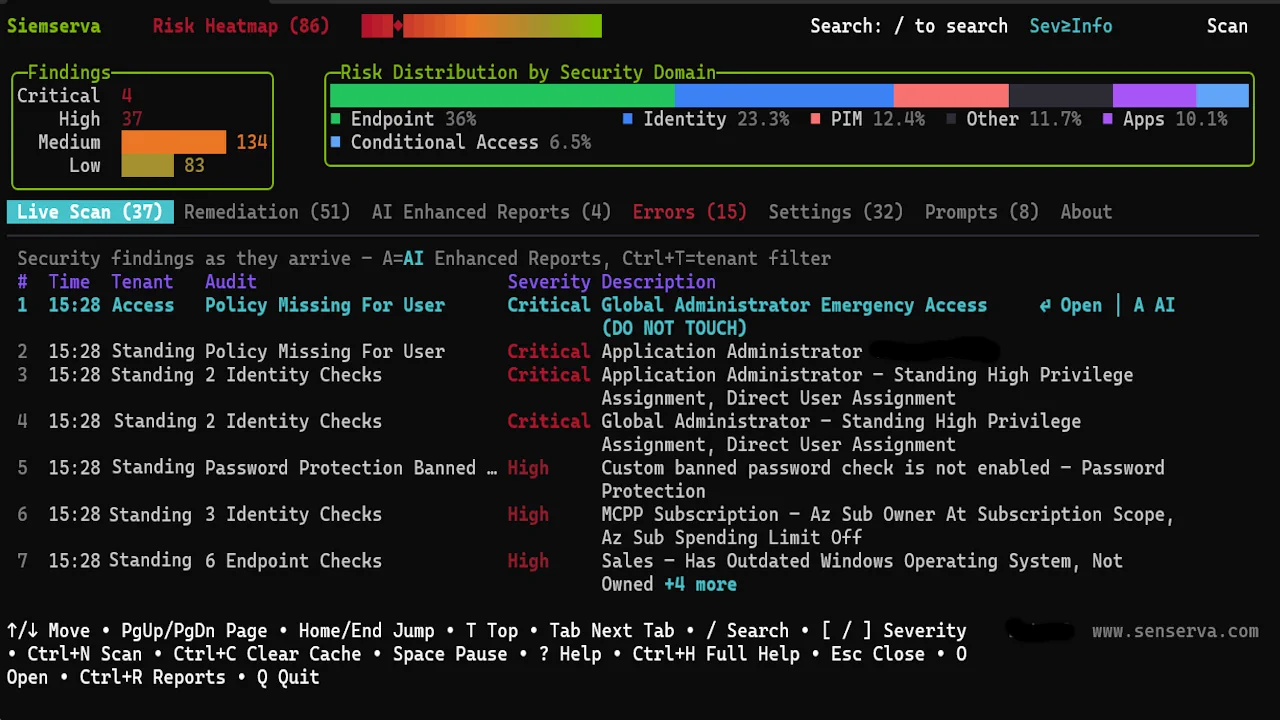
A full-screen terminal dashboard that makes security data usable. Findings stream in live as the scan runs.

siemserva — contoso.onmicrosoft.com
SIEMSERVA
Risk: 67
Live Scan 147 Remediation 42 AI Enhanced Reports Errors Settings About
# Severity Type Tenant Description
1 Critical ImConditionalAccess Contoso No Conditional Access policy enforces MFA for all users
2 Critical PaEmergencyAccess Contoso Break glass account missing MFA exclusion
3 High AsAppCredential Contoso 3 app registrations with expired credentials
4 High ImPimRolePolicy Contoso Global Admin role allows permanent assignment
5 Medium EsDeviceCompliance Contoso 14 devices non-compliant with OS policy
6 Medium ImAuthMethods Contoso SMS auth still enabled for 28 privileged users
7 Low EmPhishPolicy Contoso Anti-phish policy missing user impersonation
Siemserva main dashboard — live scan terminal with severity breakdown

Live Scan Dashboard

Real-time findings stream as the scan runs, colour-coded by severity across all 597 checks.

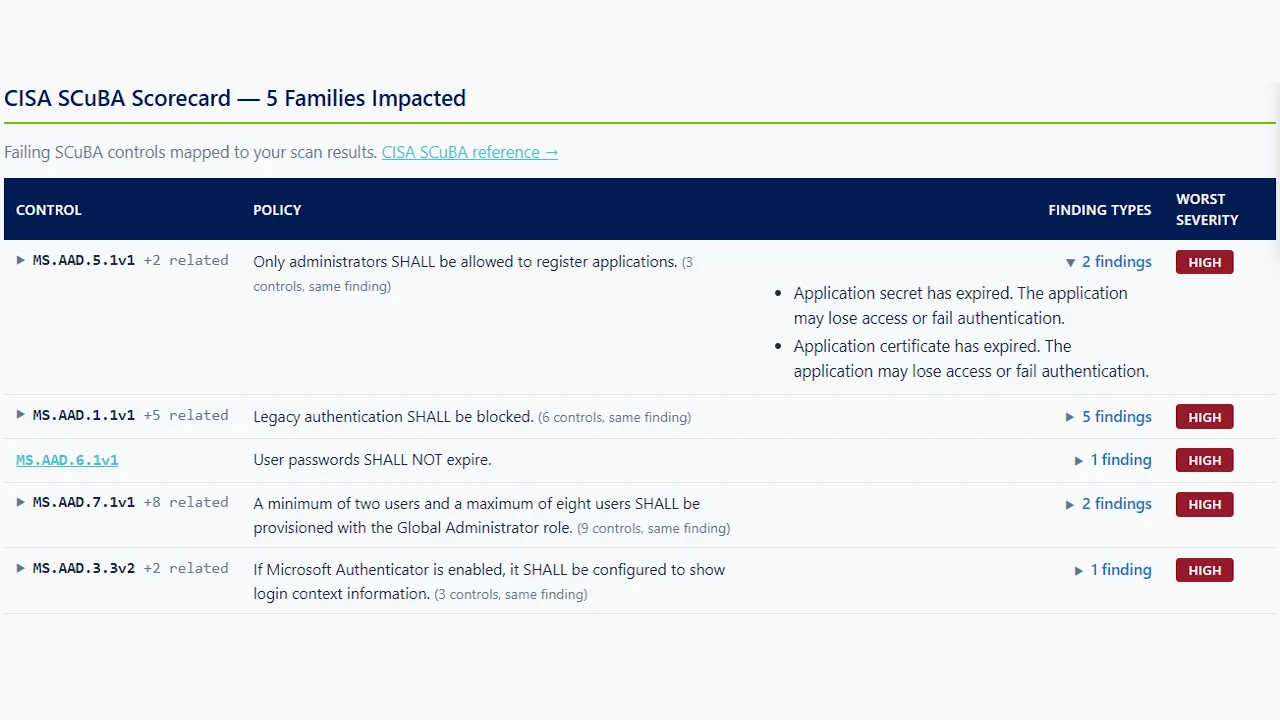
CISA SCuBA compliance score view

CISA SCuBA Score

Instant compliance posture mapped to CISA SCuBA guidelines — pass/fail at a glance.

Detailed findings report with remediation steps

Detailed Findings Report

Drill into any finding for full context, affected resources, and AI-suggested remediation steps.

Business Focused Review Sankey flow diagram

Business Focused Review (Sankey)

Visualise how findings flow from severity to remediation category — prioritise what matters most.

Every Feature You Need. Nothing You Don't.

Built by security engineers who got tired of manually checking 597 checks across dozens of tenants.

Severity Scoring

Weighted scoring system where severity compounds — five findings at one tier equal one at the next. A single numeric score reflects both severity and volume.

Learn more

Scores are calculated across four tiers — Critical, High, Medium, and Low — with each tier carrying an order-of-magnitude weight differential. This means a single Critical finding moves the needle more than a dozen Low findings combined.

  • Tenant-level score summarizes the entire environment at a glance
  • Domain-level scores let you prioritize where to focus first
  • Score history tracks remediation progress over time
  • Delta view highlights net-new findings since the last scan
  • Regression alerts flag settings that were fixed then broken again
  • Export scores and trend data to Excel for executive reporting

170+ Engineer-Authored Fix Guides

Over 170 engineer-authored remediation guides — each one hardcoded with exact Entra admin portal paths, step-by-step instructions, Microsoft Learn links, and realistic time estimates. Plus AI-generated PowerShell scripts tailored to your exact findings.

Learn more

Remediation guidance is tailored to privilege context — the fix for a Global Admin gap is different from the same gap on a standard user. Each plan accounts for blast radius, prerequisites, and rollback considerations.

  • Step-by-step portal paths with exact menu locations
  • AI-generated PowerShell scripts with -WhatIf support
  • Dependency ordering so fixes don't break each other
  • Risk narrative explains the real-world attack scenario

Conditional Access Deep Analysis

Four dedicated engines working together: in-memory rule checks, predictive What-If scenario testing (ScenarioEvaluator), forensic sign-in replay (SignInReplayAnalyzer), and structural bypass detection (DiscrepancyDetector). 50+ checks. Nobody goes deeper.

See the 4 engines

① In-Memory Rule Checks — instant per-policy analysis: persistent browser sessions, legacy auth blocks, MFA gaps, report-only detection, device compliance scope. Runs during the scan with no additional API calls.

ScenarioEvaluator — Predictive — runs 10 pre-built What-If API scenarios against your live policies: legacy auth blocking, admin portal MFA, high-risk sign-in response, device code flow, untrusted locations, Microsoft Graph access, mobile app protection, and more. Separate logic for admins vs. standard users. Coverage score 0–100 with letter grade.

SignInReplayAnalyzer — Forensic — takes 14 days of real sign-ins and replays each unique context through the What-If API. Finds enforcement failures that already happened — not theoretical gaps, but actual bypasses. 5 bypass types: MFA bypassed, device compliance bypassed, password change not enforced, policy not applied, report-only gaps.

DiscrepancyDetector — Structural Risk — finds gaps that hide inside policies that technically "apply." OR-operator bypass paths, report-only policies providing false sense of coverage, and enforcement failures at scale. Microsoft Secure Score analyzes each policy individually. This catches compound bypass paths no single-policy tool can.

Zero Agents

Runs locally and queries Microsoft Graph API directly. No agents to deploy, no infrastructure to manage. Fast mode for daily scans, full mode for weekly deep coverage.

Learn more

Siemserva is a single executable. Authenticate once with your existing credentials and it handles everything through Microsoft Graph — no service accounts, no persistent connections, no moving parts to maintain.

  • Fast mode completes most tenants in under 60 seconds
  • Full mode runs all 597 checks for deep weekly audits
  • Works with delegated or application permissions
  • Runs on Windows, macOS, and Linux

Multi-Tenant

Scan all your tenants from one dashboard. Built for MSPs and enterprises managing dozens of Entra ID environments. Each tenant scored independently.

Learn more

Switch between tenants without re-authenticating. The unified dashboard shows aggregate health across your entire portfolio while letting you drill into any individual environment.

  • Side-by-side tenant comparison to spot outliers
  • Per-tenant credential management for MSP workflows
  • Consolidated reporting for client-ready deliverables

AI Agent & Copilot Security

The only scanner that audits Copilot Agent Identity Blueprints. Flags dangerous Graph scopes like Directory.ReadWrite.All granted to unattended AI agents — with fix guides and PowerShell for every gap.

See what's covered

Microsoft Copilot agents run as service principals with delegated Graph permissions. Unlike a human account, there’s no MFA challenge, no sign-in risk evaluation, and no Conditional Access policy standing between an agent and your tenant data. A misconfigured blueprint is a standing permission grant — active 24/7, invisible to most monitoring tools.

  • Blueprint Discovery — finds every Agent Identity Blueprint in the tenant
  • High-Risk Scope Detection — flags Directory.ReadWrite.All, RoleManagement.ReadWrite.Directory, and similar scopes granted to AI agents
  • Agent Identity Audit — inventories all service principals representing AI agents
  • User–Agent Binding — surfaces delegated permissions inherited by agent users
  • AI Posture Baseline — 7 checks across content filtering, least-privilege functions, human-in-the-loop controls
MCSB v2

Microsoft Cloud Security Benchmark

12 × 66

12 security domains, 66 controls. Microsoft's own benchmark, aligned with NIST SP 800-53.

CISA SCuBA

Secure Cloud Business Applications

Federal

US federal security baselines for M365, increasingly adopted by private sector. Full control mapping with version tracking.

Compliance From Finding to Fixed — In Minutes

Siemserva doesn’t hand you a spreadsheet and wish you luck. Its built-in AI agent reads every finding, reasons about the real-world attack path, and builds you an executable fix plan — PowerShell script and all — before you’ve finished reading the description.

1 — Audit

597 checks run in a single scan. Findings are severity-scored (Critical / High / Medium / Low) with compound weighting so a single Critical outweighs a dozen Lows. Delta view shows net-new issues since your last scan.

2 — Map to Compliance

Every finding is cross-referenced against MCSB v2 and CISA SCuBA controls automatically. Your Compliance report exports timestamped, auditor-ready evidence for each control — no manual mapping required.

3 — Remediate with AI

Press A and the AI agent analyzes the finding, reasons about your tenant context, and produces a prioritized fix plan with attack-path narrative. Press P and it writes a production-ready PowerShell script — -WhatIf safe, saved to disk, ready to run. No copy-paste. No hallucinated cmdlets. Grounded in 170+ engineer-authored guides.

Compliance Frameworks Covered

  • MCSB v2 — Microsoft Cloud Security Benchmark, full control mapping with pass/fail evidence per check
  • CISA SCuBA — Secure Cloud Business Applications baseline, including M365 and Entra specific controls
  • Timestamped evidence packages ready to attach to auditor requests, SOC 2 reviews, or internal governance reports
  • SCuBA score and MCSB pass rate shown in the dashboard alongside your security score

Agentic AI That Acts, Not Just Advises

  • AI fix plans grounded in engineer-authored guides — the AI reasons over 170+ human-written remediation docs so outputs are accurate, not hallucinated
  • Executable PowerShell, written for your tenant — production-ready .ps1 with -WhatIf support, auto-saved; not a generic snippet you have to adapt
  • Attack-path reasoning — the agent explains the real-world exploit scenario behind every finding, not just the setting name, so you can prioritize with confidence
  • Dependency-aware sequencing — the agent orders fixes so they don’t break each other; sequence matters, and it knows it

Four Report Types, One Keystroke

Detailed Full technical findings for engineers — every check, every result
Compliance MCSB + SCuBA control mapping with auditor-ready evidence
Business Review Executive-focused summary — risk in plain language, no jargon
Remediation Prioritised fix list with scripts and portal steps, ready to act on

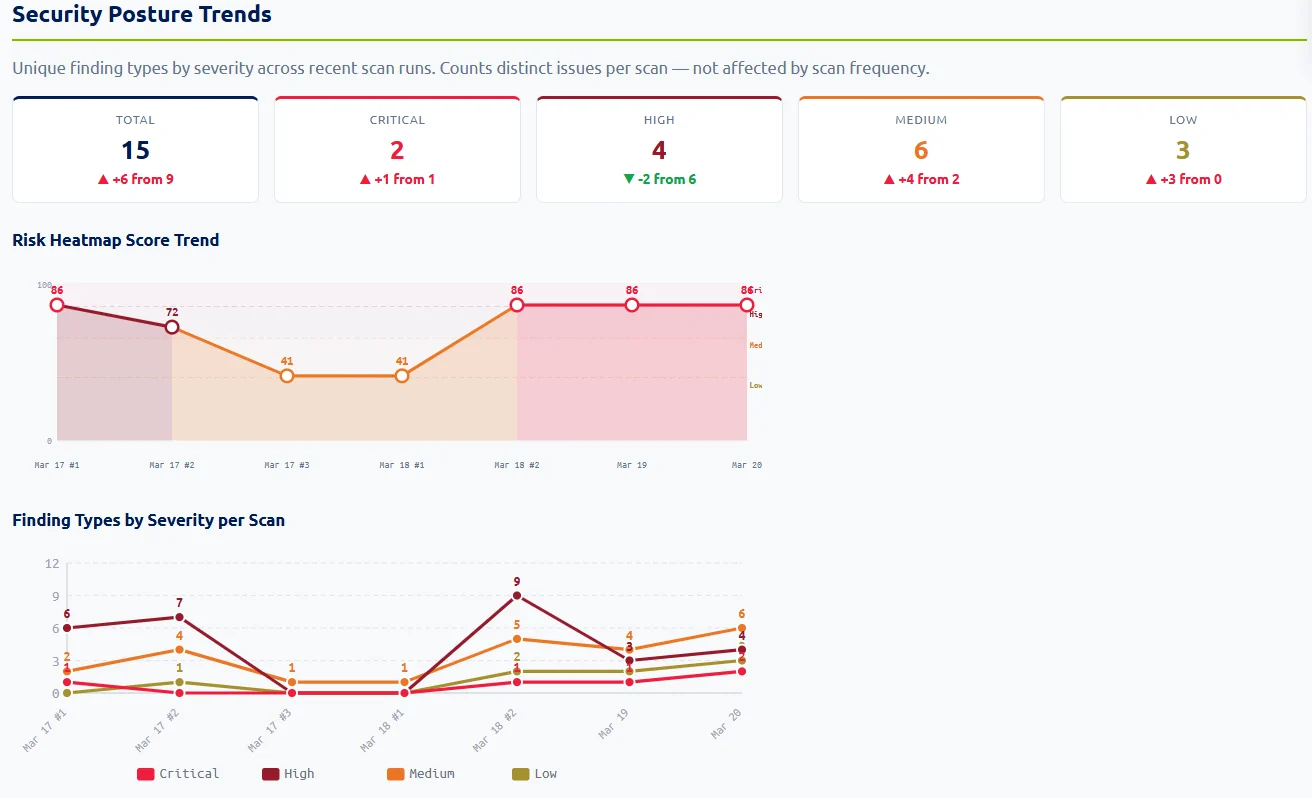
Track Progress Over Time

  • Score history tracks remediation progress across scans — see the trend, not just the snapshot
  • Delta view highlights net-new findings since the last scan so regression doesn’t sneak through
  • Regression alerts flag settings that were fixed and then broken again
  • Export scores and trend data to Excel for board-level reporting and QBRs

SIEM Mode — Continuous Security Monitoring

Run Siemserva as a persistent security monitor. Scheduled scans, multi-tenant support, and a structured local database that grows smarter with every cycle.

Automatic Recurring Scans

Set scans to run automatically on any cadence — hourly, daily, or weekly. A live game-clock countdown shows exactly when the next cycle fires, so you always know your data freshness at a glance.

Learn more
  • Choose hourly, daily, or weekly cadence per tenant — mix and match based on criticality
  • Two scan depths: Fast mode targets the highest-impact checks and completes most tenants in under 60 seconds; Full mode runs all 597 checks for deep weekly audits
  • Authentication uses a cached refresh token — no re-prompting between scheduled cycles, no service account required
  • The refresh token is stored encrypted locally; each cycle exchanges it silently for a fresh access token via the Microsoft identity platform

Trend Detection

Every scan result is stored and compared against previous cycles. See your posture score rise or fall over time, drill into which checks changed between runs, and demonstrate continuous improvement to leadership.

Learn more
  • Score trajectory chart shows whether your posture is improving or regressing over time
  • Delta view flags exactly which checks changed state between any two runs
  • Regression alerts highlight settings that were fixed and then broken again
  • New findings since the last scan are marked so you can prioritize what appeared recently
  • Trend data is exportable for compliance evidence packages and board-level reporting

Persistent Storage

Findings are written to an encrypted local SQLite database after every scan. The database is designed to grow slowly and can hold well over a gigabyte of scan history. Archive or back up your data any time — it's a file copy, because that's all it is.

Learn more
  • Standard SQLite with WAL mode — open with any SQL tool, no proprietary driver needed
  • Backup and archival are a file copy — no export wizard, no special tooling, no downtime
  • Designed for long-term retention: compact schema, delta-efficient writes, comfortably holds 1 GB+ of history
  • Query with Power BI, Python, C#, PowerShell, Excel, or any ODBC client
  • Local-only by default — data never leaves your environment unless you export it

Integrated AI Analysis

Every scan cycle feeds a growing body of evidence that AI can reason over. Press A after any scan to generate a prompt pre-loaded with your current findings, trend history, and compliance mappings — or use Ctrl+R to stream a full AI-enhanced report directly to your browser.

Learn more
  • AI sees your full scan history — not just today's results. It can identify which findings keep reappearing and what that pattern suggests about root causes
  • Four report types: Detailed drill-down, Compliance (MCSB + SCuBA), Business Focused Review, and Remediation with priority-ordered fix steps
  • Works with any AI — prompt is copied to clipboard for use with Claude, ChatGPT, Gemini, or any tool you already use. Add an Anthropic API key for fully automated streaming reports
  • Remediation tab generates executable PowerShell scripts on demand — press P and AI writes .ps1 files tailored to your specific findings, with -WhatIf dry-run support built in
  • AI results are imported back into the dashboard with Ctrl+V, then automatically woven into a self-contained HTML report that opens in your browser

Structured Local SQLite Database

Every scan writes to a local SQLite database — 116 node tables, 78 edge tables, and a full audit log covering findings, entities, relationships, sign-in events, and identity graph topology. Query with Power BI, Python, PowerShell, C#, Excel, or any SQL tool. No proprietary driver, no lock-in.

Built for Everyone Else

Maester, ScubaGear, Microsoft's own Zero Trust Assessment — they all do useful work. They're built for people who already know what they're looking for. Siemserva is built for everyone else — and for teams who use scripts today but need more depth, more remediation, and less manual work.

Simple, Transparent Pricing

Start free. Upgrade when you need more tenants, more checks, or AI API streaming.

After June 1, 2026, Professional is $499/yr. Buy now at $99/yr and it’s locked in forever — your price never goes up.
Free
$0
forever
  • 2 tenants · 50 users
  • Core identity checks
  • Live dashboard & HTML reports
  • Copy/Paste AI (no API key needed)
  • PowerShell scripts & SDK
Microsoft MVPs and MISA Members
Free
full product — unlimited use
  • Unlimited tenants & users
  • All 597 checks
  • Full AI API streaming
  • All report types & compliance maps
  • Manager’s Edition (PDF & Excel) When Shipping
  • We both work closely with Microsoft
  • MISA wants us to work together
  • All we ask: share feedback & help us test betas
Contact Us

MSP, MSSP, or need at-scale multi-tenant pricing? Contact us — we’ll tailor a plan for your environment.

How Siemserva Compares to PowerShell Scripts

Open-source scripts like Maester and ScubaGear do useful work. Here's what you get when you need more.

PowerShell Scripts Maester, ScubaGear, etc. — Free
Siemserva Free tier — $99/yr launch price
Security checks
~200 checks
597 checks across 15 domains
Conditional Access depth
Policy pass/fail checks
4 engines · What-If API · sign-in replay · 50+ checks
Remediation
Pass / Fail — you figure out the rest
317 scripts · step-by-step plans · AI-generated PowerShell
AI analysis
None
8 AI workflows · 4 report types · real-time streaming
Reports
HTML / JSON output
9 report types · HTML, PDF, Excel, structured data
Multi-tenant
Run per tenant, manually
Unified live dashboard, all tenants
Compliance mapping
SCuBA / CIS
MCSB v2 + CISA SCuBA — automatic
Setup
PowerShell, modules, pipeline
Download and run — first scan in minutes
Price
Free — open source
Free tier available · $99/yr gets you everything

Scripts are great for CI/CD pipelines and teams with PowerShell expertise. Siemserva is for everyone else — and for $99/yr, it's an easy addition even if you already use scripts.

How Siemserva Compares to Inforcer

Inforcer manages Conditional Access policy templates at scale. Siemserva audits whether those policies — and everything else — actually work.

Inforcer Conditional Access enforcement platform — enterprise pricing
Siemserva Free tier — $99/yr launch price
Primary job
Push & enforce Conditional Access policy templates
Audit, score, find gaps, remediate everything
Does your Conditional Access actually enforce MFA?
Assumes policies are working
Proves it — via What-If API + sign-in replay
Conditional Access analysis depth
Policy templates & coverage view
4 engines · 10 What-If scenarios · 5 bypass types · 50+ checks
Bypass detection
Not included
Finds MFA bypasses that already happened in your logs
Security coverage beyond Conditional Access
Conditional Access only
597 checks — identity, endpoint, apps, M365, PIM, logging
Client-ready reports
Policy state & coverage reports
4 HTML report types — Detailed, Compliance, Business Review, Remediation
AI analysis
None
8 AI workflows · attack path, business risk, remediation roadmap
Compliance mapping
Not included
MCSB v2, SCuBA — built in
Right for
300+ tenant Conditional Access automation shops
Every MSP, MSSP, and enterprise security team
Price
Contact for enterprise pricing
Free tier · $99/yr launch · Enterprise from $1,999/yr

Different tools for different jobs. Inforcer enforces Conditional Access templates at scale. Siemserva audits the entire tenant — including whether Conditional Access policies are actually enforced.

How Siemserva Compares to Microsoft Zero Trust Assessment

Microsoft's Zero Trust Assessment (public preview) covers Identity and Devices. Here's how the coverage compares.

MS Zero Trust Assessment Public preview — PowerShell tool
Siemserva Free tier — $99/yr launch price
Security checks
"Hundreds" (exact count undisclosed)
597 checks — every one documented
Zero Trust pillars covered
Identity + Devices only (2 of 6)
Identity, devices, apps, data, email, AI agents — full tenant
M365 workloads
Entra ID + Intune only
Exchange, SharePoint, Teams, OneDrive, Defender
AI agent auditing
Not included
Copilot Agent Identity Blueprints, dangerous scope detection
Remediation
Guidance only — manual steps
170+ fix guides + AI-generated PowerShell scripts
AI analysis
None
8 AI workflows · 4 report types · streaming analysis
Conditional Access depth
Policy configuration checks
4 engines · What-If API · sign-in replay · bypass detection
Live dashboard
Static HTML report
Interactive TUI · real-time scan · multi-tenant
Compliance mapping
NIST, CIS, CISA baselines
MCSB v2 + CISA SCuBA — mapped per finding
Maturity
Public preview — feature set incomplete
Production-ready · shipping now
Setup
PowerShell 7+ · Global Admin consent · multi-step install
Download one .exe · Global Admin consent · scanning in minutes
Price
Free
Free tier available · $99/yr gets you everything

Microsoft's tool is a solid baseline for Identity and Devices. Siemserva covers the full tenant with remediation and AI built in.

Trusted by Microsoft. Proven in the Field.

Senserva is a Microsoft Intelligent Security Association (MISA) member and Microsoft Security Excellence Awards finalist. Built by the team behind Shavlik Technologies.

MEMBER OF THE Microsoft Intelligent Security Association Microsoft

MISA Member

Invited to join the Microsoft Intelligent Security Association for deep integration with Microsoft Entra ID, Intune, and M365 security.

What is MISA?

The Microsoft Intelligent Security Association is an ecosystem of independent software vendors and managed security service providers that have integrated their solutions with Microsoft's security products.

  • Membership is by invitation only
  • Members undergo technical validation by Microsoft
  • Deep product integration with Entra ID, Intune & M365 security
  • Co-sell and co-market with Microsoft's global security team
Microsoft Security Excellence Awards 2024 Microsoft Intelligent Security Association FINALIST Senserva Security ISV of the Year

Security ISV of the Year

Finalist in the 2024 Microsoft Security Excellence Awards — recognized for impact in Microsoft 365 security.

Your Data Never Leaves Your Machine.

No cloud pipeline. No telemetry. No third-party storage. Siemserva runs locally and queries Microsoft Graph directly — everything stays where it belongs.

Scan Data Stays On-Premises

All findings, scores, and tenant data are written to a local SQLite database on your machine. Nothing is transmitted to Senserva, Azure, or any external service — unless you explicitly export or send it yourself.

AI Prompts Are PII-Free

Before any data is used in an AI prompt, Siemserva strips tenant names, user names, and system identifiers. What leaves your machine for AI analysis is anonymized finding data — never raw customer identity information.

No API Key Required

Press A to generate a ready-to-paste prompt. Take it to ChatGPT, Copilot, Claude, Gemini, or any AI tool. Press Ctrl+V inside Siemserva to import the response directly into your report. Full AI analysis, zero account setup.

Optional Direct API Streaming

Run siemserva setup-ai for a guided wizard that connects directly to the Anthropic Claude API — live streaming, no intermediary. Or set ANTHROPIC_API_KEY directly. OpenAI-compatible and M365 Copilot support coming soon Future.

Ready to Secure Your M365 Tenants?

One scan reveals every gap in your tenant. Download free and run your first scan in minutes.

Siemserva End User License Agreement Click to expand
SIEMSERVA END USER LICENSE AGREEMENT This End User License Agreement ("Agreement") is between the person or entity purchasing or downloading Siemserva ("you" or "Client") and Senserva, LLC, with its principal place of business at 4661 White Bear Parkway, St. Paul, MN 55110 (hereinafter, "Senserva"). Senserva and Client are collectively referred to as the "Parties." Effective Date: January 21, 2026 SENSERVA PROVIDES SIEMSERVA SOFTWARE SOLELY ON THE TERMS AND CONDITIONS SET FORTH IN THIS AGREEMENT. BY PURCHASING, DOWNLOADING, INSTALLING, OR USING SIEMSERVA IN ANY WAY, YOU REPRESENT AND WARRANT THAT YOU HAVE THE AUTHORITY TO ACCEPT THIS AGREEMENT ON YOUR OWN BEHALF OR IF CLIENT IS A CORPORATION, ORGANIZATION, OR OTHER LEGAL ENTITY, YOU HAVE THE RIGHT, POWER, AND AUTHORITY TO ENTER INTO THIS AGREEMENT ON BEHALF OF CLIENT. IF YOU DO NOT AGREE TO THESE TERMS, SENSERVA WILL NOT AND DOES NOT LICENSE SIEMSERVA TO YOU AND YOU MUST NOT DOWNLOAD, INSTALL, OR USE SIEMSERVA. AGREEMENT 1. License Grant and Types. 1.1. License Types. Siemserva is available under the following license types: (a) Annual License: A paid annual subscription license that grants access to Siemserva for a period of twelve (12) months, renewable annually. (b) Non-Profit License: A complimentary license available at no charge to qualified non-profit organizations with valid 501(c)(3) status or equivalent international non-profit designation, granted on an annual basis subject to verification of non-profit status. (c) One-Week License: A paid single-use license that grants access to Siemserva for one-time use with a seven (7) day grace period for completion of assessment activities. 1.2. Grant of License. Subject to the terms and conditions of this Agreement and payment of applicable fees (if any), Senserva hereby grants to Client, solely for Client's internal business purposes, a non-exclusive, non-transferable, non-sublicensable license to (a) install, access, download, use, and run Siemserva software on Client's devices for the purpose of conducting Microsoft 365 security assessments and generating security reports; and (b) prepare, reproduce, print, download, and use a reasonable number of copies of the generally available user documentation relating to Siemserva (including user manuals, operating manuals, and other instructions, specifications, documents, and materials provided by Senserva to Client) as may be necessary or useful for any use of Siemserva permitted under this Agreement. 1.3. Non-Profit License Requirements. To qualify for and maintain a Non-Profit License, Client must: (a) Provide valid documentation of 501(c)(3) status or equivalent international non-profit designation upon request; (b) Use Siemserva solely for the non-profit organization's internal security assessment purposes; (c) Not use Siemserva to provide commercial services to other entities; (d) Reverify non-profit status annually upon license renewal. Senserva reserves the right to convert a Non-Profit License to an Annual License if Client no longer qualifies as a non-profit organization or fails to provide requested verification documentation. 1.4. One-Week License Limitations. One-Week Licenses are subject to the following additional limitations: (a) Valid for one-time use for a single security assessment project or engagement; (b) License period of seven (7) days from the date of first installation or use to provide grace period for completing assessment activities; (c) Automatically expire after seven (7) days without further action required by either party; (d) Not available to clients who have previously used a One-Week License; (e) Cannot be renewed or extended; subsequent use requires purchase of an Annual License or qualification for a Non-Profit License. 2. Restrictions. Except as expressly permitted in this Agreement, Client must not: (a) copy, modify, reverse engineer, decompile, disassemble, or otherwise attempt to derive or gain access to the source code of Siemserva, or attempt to do so; (b) install or use any third-party software or technology in any way that would subject Senserva's intellectual property or technology to any other license terms; (c) work around any technical limitations in Siemserva; (d) use Siemserva for any unlawful purpose; (e) distribute, sublicense, rent, lease, or lend Siemserva, in whole or in part to any other person or entity (except for third party service providers or contractors that access Siemserva in the provision of services to Client), or use it to offer hosting services to a third party; (f) publish, or otherwise make available to any third party, any benchmark testing information or results relating to Siemserva; (g) use Siemserva for any function other than internal business use or provision of professional services to Client's customers without express written consent from Senserva; or (h) remove, obscure, or modify any copyright, trademark, or other proprietary notices contained in or displayed by Siemserva. 3. Intellectual Property Rights and Ownership. Rights to access or use Siemserva do not give Client any right to implement Senserva's patents or other intellectual property. All right, title, or interest in or to the copyrights, trademarks, patents, trade secrets and all other intellectual property rights in Siemserva are and shall remain with Senserva. Senserva may place copyright and/or proprietary notices, including hypertext links, within Siemserva indicating Senserva's proprietary interest therein. Client may not remove, obscure or modify such notices without Senserva's prior written permission. Client acknowledges and agrees that Siemserva is provided under license, and not sold, to Client. Client does not acquire any ownership interest in Siemserva under this Agreement, or any other rights thereto, other than to use the same in accordance with the license granted and subject to all terms, conditions, and restrictions under this Agreement. Senserva reserves and shall retain its entire right, title, and interest in and to Siemserva and all intellectual property rights arising out of or relating to Siemserva, except as expressly granted to the Client in this Agreement. Client shall safeguard Siemserva from infringement, misappropriation, theft, misuse, or unauthorized access. 4. Third-Party Materials. Siemserva may include software, content, data, or other materials, including related documentation, that are owned by persons other than Senserva and that are provided to Client on terms that are in addition to and/or different from those contained in this Agreement ("Third-Party Components"). Any such Third-Party Components are licensed to Client under the terms of the applicable third-party licensor. 5. Use of Microsoft Graph APIs. Siemserva uses Microsoft Graph APIs to collect security configuration data from Client's Microsoft 365 tenant for the purpose of security assessment and compliance validation. Senserva does not store, transmit, or remove this data from Client's environment, nor is it used for any purpose other than generating security assessment reports for Client's use. Siemserva operates with read-only permissions and makes no modifications to Client's Microsoft 365 configurations. Senserva may use documented or undocumented Microsoft APIs to provide comprehensive security assessment coverage and framework controls mapping. 6. Data Privacy and Security. Siemserva operates locally on Client's devices and does not transmit security assessment data to Senserva or any third party. All security scans, analysis, and report generation occur on Client's local system. Assessment reports are stored locally on Client's devices and Client maintains full control over distribution and storage of such reports. Senserva may collect anonymized usage statistics (such as feature usage, error logs, and performance metrics) for the purpose of improving Siemserva, but such data collection does not include any Client security findings, configurations, or identifiable information from Client's Microsoft 365 environment. 7. End Users. Client will control access to and use of Siemserva by end users and is responsible for any use of Siemserva that does not comply with this Agreement. Specifically, and without limiting the generality of the foregoing, Client is responsible and liable for all actions and failures to take required actions with respect to Siemserva by its authorized users or by any other person to whom Client or an authorized user may provide access to or use of Siemserva, whether such access or use is permitted by or in violation of this Agreement. 8. Fees and Payments. 8.1. Annual License Fees. Annual License fees are payable in advance for each twelve (12) month license period. All fees are non-refundable except as may be expressly set forth in Section 11 (Limited Warranties). Senserva may increase Annual License fees upon thirty (30) days' prior written notice to Client, with such increases effective upon the next license renewal date. 8.2. One-Week License Fees. One-Week License fees are payable in advance as a one-time payment. All fees are non-refundable except as may be expressly set forth in Section 11 (Limited Warranties). One-Week Licenses are designed for single-use security assessment projects with a seven (7) day grace period for completion. 8.3. Non-Profit License. Non-Profit Licenses are provided at no charge to qualified non-profit organizations. Senserva reserves the right to verify non-profit status at any time and to convert Non-Profit Licenses to Annual Licenses if Client no longer qualifies or fails to provide requested verification. 8.4. Future Updates. Updates and enhancements to Siemserva, including additional framework support (MCSB, MITRE ATT&CK), web interface, and mobile applications, are included in the Annual License and Non-Profit License at no additional charge. One-Week License holders may access updates available during their seven (7) day license period but are not entitled to future updates released after license expiration. 9. Term & Termination. 9.1. Term. (a) Annual Licenses commence on the date of purchase and continue for an initial term of twelve (12) months ("Initial Term"), automatically renewing for successive twelve (12) month periods ("Renewal Terms") unless terminated in accordance with this Agreement. (b) Non-Profit Licenses commence on the date of approval and continue for twelve (12) months, subject to annual reverification of non-profit status and renewal at Senserva's discretion. (c) One-Week Licenses commence on the date of first installation or use and expire automatically after seven (7) days. One-Week Licenses are non-renewable and intended for single-use security assessment projects only. 9.2. Termination by Client. Client may terminate an Annual License by providing written notice to Senserva at least thirty (30) days prior to the end of the then-current term. No refunds will be provided for early termination. 9.3. Termination by Senserva. Senserva may terminate this Agreement: (a) For Annual Licenses, by providing sixty (60) days' written notice to Client; (b) For Non-Profit Licenses, immediately upon determination that Client no longer qualifies as a non-profit organization or upon Client's failure to provide requested verification; (c) For any license type, effective upon written notice to Client if Client materially breaches this Agreement and such breach: (i) is incapable of cure; or (ii) being capable of cure, remains uncured thirty (30) days after Senserva provides written notice thereof. 9.4. Termination for Insolvency. Either party may terminate effective immediately if the other party files, or has filed against it, a petition for voluntary or involuntary bankruptcy or pursuant to any other insolvency law, makes or seeks to make a general assignment for the benefit of its creditors or applies for, or consents to, the appointment of a trustee, receiver, or custodian for a substantial part of its property. 9.5. Effect of Termination. Upon termination or expiration of this Agreement, the license granted hereunder shall also terminate, and Client shall cease using Siemserva and shall uninstall all copies of Siemserva from Client's devices. No termination shall affect Client's obligation to pay all fees that may have become due before such termination, or entitle Client to any refund, except as explicitly provided in Section 11 (Limited Warranties). The provisions of this Agreement that, by their nature, should survive termination or expiration of this Agreement, will do so, including without limitation Sections 3, 10, 11, 12, 13, and 14. 10. Collection and Use of Information. Client acknowledges that Senserva may, directly or indirectly, collect and store anonymized information regarding use of Siemserva, including but not limited to feature usage, error logs, crash reports, and performance metrics. Such information does not include any security findings, configurations, or identifiable data from Client's Microsoft 365 environment. Client agrees that Senserva may use such anonymized information for any purpose related to improving Siemserva, including but not limited to: improving the performance of Siemserva or developing updates; verifying Client's compliance with the terms of this Agreement and enforcing Senserva's rights, including all intellectual property rights in and to Siemserva. 11. Limited Warranties. Senserva warrants that Siemserva will substantially contain the functionality described in the then-current user documentation, and when properly installed according to specifications, will substantially perform in accordance therewith for a period of thirty (30) days from the date of purchase or first use ("Warranty Period"). The foregoing warranties will not apply and will become null and void if Client (including any authorized user or any other person provided access to Siemserva by Client or any authorized user): (i) installs or uses Siemserva on or in connection with any hardware or software not meeting the minimum system requirements specified by Senserva; (ii) modifies or damages Siemserva; or (iii) misuses Siemserva. Subject to Client's prompt written notification to support@senserva.com of a failure of the foregoing warranty during the Warranty Period, Senserva's sole liability (and Client's sole remedy) will, at Senserva's option, be to: (i) repair or replace Siemserva, provided that Client provides Senserva with all information Senserva reasonably requests to resolve the reported failure, including sufficient information to enable Senserva to recreate such failure; or (ii) for Annual Licenses and One-Week Licenses, refund the license fee paid (or for Annual Licenses, a pro-rata portion based on the unused portion of the license term), subject to Client's ceasing all use of Siemserva and uninstalling all copies from Client's devices. EXCEPT AS EXPRESSLY SET FORTH ABOVE, SIEMSERVA IS PROVIDED "AS IS" AND WITH ALL FAULTS AND DEFECTS WITHOUT WARRANTY OF ANY KIND. TO THE MAXIMUM EXTENT PERMITTED UNDER APPLICABLE LAW, SENSERVA, ON ITS OWN BEHALF AND ON BEHALF OF ITS AFFILIATES AND ITS AND THEIR RESPECTIVE LICENSORS AND SERVICE PROVIDERS, EXPRESSLY DISCLAIMS ALL WARRANTIES, WHETHER EXPRESS, IMPLIED, STATUTORY, OR OTHERWISE, WITH RESPECT TO SIEMSERVA, INCLUDING ALL IMPLIED WARRANTIES OF MERCHANTABILITY, FITNESS FOR A PARTICULAR PURPOSE, TITLE, AND NON-INFRINGEMENT, AND WARRANTIES THAT MAY ARISE OUT OF COURSE OF DEALING, COURSE OF PERFORMANCE, USAGE, OR TRADE PRACTICE. WITHOUT LIMITATION TO THE FOREGOING, SENSERVA PROVIDES NO WARRANTY OR UNDERTAKING, AND MAKES NO REPRESENTATION OF ANY KIND THAT SIEMSERVA WILL MEET CLIENT'S REQUIREMENTS, ACHIEVE ANY INTENDED RESULTS, BE COMPATIBLE, OR WORK WITH ANY OTHER SOFTWARE, APPLICATIONS, SYSTEMS, OR SERVICES, OPERATE WITHOUT INTERRUPTION, MEET ANY PERFORMANCE OR RELIABILITY STANDARDS OR BE ERROR FREE, OR THAT ANY ERRORS OR DEFECTS CAN OR WILL BE CORRECTED. SIEMSERVA PROVIDES SECURITY ASSESSMENT AND COMPLIANCE FRAMEWORK MAPPING CAPABILITIES BUT DOES NOT GUARANTEE COMPLIANCE WITH ANY SECURITY FRAMEWORK, REGULATION, OR STANDARD. CLIENT IS SOLELY RESPONSIBLE FOR ENSURING COMPLIANCE WITH APPLICABLE SECURITY REQUIREMENTS, REGULATIONS, AND STANDARDS. SIEMSERVA'S SECURITY FINDINGS AND REMEDIATION RECOMMENDATIONS ARE PROVIDED FOR INFORMATIONAL PURPOSES ONLY AND DO NOT CONSTITUTE LEGAL, COMPLIANCE, OR SECURITY ADVICE. 12. Limitation of Liability. IN NO EVENT WILL SENSERVA OR ITS AFFILIATES, LICENSORS, SERVICE PROVIDERS, EMPLOYEES, AGENTS, OFFICERS, OR DIRECTORS (COLLECTIVELY, "SENSERVA PARTIES") HAVE LIABILITY FOR ANY DIRECT, CONSEQUENTIAL, SPECIAL, LOST PROFIT, PUNITIVE OR RELIANCE DAMAGES, OR INDIRECT LOSS FOR DAMAGES, REGARDLESS OF WHETHER SUCH DAMAGES ARE BASED ON CONTRACT, TORT (INCLUDING NEGLIGENCE), STRICT LIABILITY OR ANY OTHER THEORY OR FORM OF ACTION OR WHETHER THE SENSERVA PARTIES OR CLIENT KNEW OR SHOULD HAVE KNOWN OF THE LIKELIHOOD OF SUCH DAMAGES IN ANY CIRCUMSTANCES. TO THE MAXIMUM EXTENT PERMITTED BY APPLICABLE LAW, IN NO EVENT SHALL THE AGGREGATE LIABILITY OF SENSERVA PARTIES EXCEED THE AMOUNT PAID BY CLIENT FOR SIEMSERVA IN THE TWELVE (12) MONTHS PRECEDING THE EVENT GIVING RISE TO LIABILITY. FOR NON-PROFIT LICENSES PROVIDED AT NO CHARGE, SENSERVA'S MAXIMUM AGGREGATE LIABILITY SHALL NOT EXCEED ONE HUNDRED DOLLARS ($100). THE PARTIES AGREE THAT THE LIMITATION AND EXCLUSIONS OF LIABILITY AND DISCLAIMERS SPECIFIED IN THIS AGREEMENT WILL SURVIVE AND APPLY EVEN IF FOUND TO HAVE FAILED OF THEIR ESSENTIAL PURPOSE. THE LIMITATIONS SET FORTH IN THIS SECTION SHALL APPLY EVEN IF CLIENT'S REMEDIES UNDER THIS AGREEMENT FAIL OF THEIR ESSENTIAL PURPOSE. 13. Indemnification. Client agrees to indemnify, defend, and hold harmless Senserva Parties from and against any and all losses, damages, liabilities, deficiencies, claims, actions, judgments, settlements, interest, awards, penalties, fines, costs, or expenses of whatever kind, including reasonable attorneys' fees, arising from or relating to Client's use or misuse of Siemserva or Client's breach of this Agreement, including but not limited to any actions taken based on Siemserva's security findings or recommendations. 14. Export Control. Siemserva may be subject to US export control laws. Client shall not, directly or indirectly, export, re-export, or release Siemserva to, or make Siemserva accessible from, any jurisdiction or country to which export, re-export, or release is prohibited by law, rule, or regulation. Client shall comply with all applicable federal laws, regulations, and rules, and complete all required undertakings (including obtaining any necessary export license or other governmental approval), prior to exporting, re-exporting, releasing, or otherwise making Siemserva available outside the US. 15. US Government Rights. Siemserva includes commercial computer software, as such term is defined in 48 C.F.R. §2.101. Accordingly, if Client is the US Government or any contractor therefor, Client shall receive only those rights with respect to Siemserva as are granted to all other end users under license, in accordance with (a) 48 C.F.R. §227.7201 through 48 C.F.R. §227.7204, with respect to the Department of Defense and their contractors, or (b) 48 C.F.R. §12.212, with respect to all other US Government licensees and their contractors. 16. Governing Law and Venue. The validity, interpretation, construction, performance, enforcement, and remedies of or relating to this Agreement, and the rights and obligations of the Parties to this Agreement, shall be governed and construed in all respects by the substantive laws of the State of Minnesota (without regard to the conflict of laws rules or statutes of Minnesota or any other jurisdiction that might result in the application of other law). Any legal action or proceeding arising under this Agreement will be brought exclusively in the federal or state courts located in Hennepin County, Minnesota, and the parties irrevocably consent to the personal jurisdiction and venue therein. 17. Force Majeure. Senserva will not be responsible or liable to Client, or deemed in default or breach hereunder by reason of any failure or delay in the performance of its obligations hereunder where such failure or delay is due to strikes, labor disputes, civil disturbances, riot, rebellion, invasion, epidemic, hostilities, war, terrorist attack, embargo, natural disaster, acts of God, flood, fire, sabotage, fluctuations or non-availability of electrical power, heat, light, air conditioning, or Client equipment, loss and destruction of property, or any other circumstances or causes beyond Senserva's reasonable control. 18. Notice. All notices and other communications required or permitted to be given hereunder shall be in writing and shall be deemed to have been duly given if delivered personally, by email, or mailed first class, postage prepaid to: Senserva, LLC, 4661 White Bear Parkway, St. Paul, MN 55110, Email: info@senserva.com, or to such other addresses as one party may have furnished to the other in writing. 19. Waiver. Failure by either party at any time to enforce any obligation by the other party to claim a breach of any term of this Agreement or to exercise any power agreed to hereunder will not be construed as a waiver of any right, power or obligation under this Agreement, will not affect any subsequent breach and will not prejudice either party in regard to any subsequent action. 20. Assignment. Client shall not assign or otherwise transfer any of its rights, or delegate or otherwise transfer any of its obligations or performance, under this Agreement, in each case whether voluntarily, involuntarily, by operation of law, or otherwise, without Senserva's prior written consent. For purposes of the preceding sentence, and without limiting its generality, any merger, consolidation, or reorganization involving Client will be deemed to be a transfer of rights, obligations, or performance under this Agreement for which Senserva's prior written consent is required. Any purported assignment, delegation, or transfer in violation hereof is void. Senserva may freely assign or otherwise transfer all or any of its rights, or delegate or otherwise transfer all or any of its obligations or performance, under this Agreement without Client's consent. This Agreement is binding upon and inures to the benefit of the parties hereto and their respective permitted successors and assigns. 21. Complete Agreement. This Agreement constitutes the entire agreement of the Parties with respect to Siemserva. There are no other agreements, either express or implied, with regard to this subject matter. This Agreement may only be amended, modified, or supplemented by an agreement in writing signed by each party hereto. This Agreement is for the sole benefit of the parties hereto and their respective successors and permitted assigns and nothing herein, express or implied, is intended to or shall confer upon any other person any legal or equitable right, benefit, or remedy of any nature whatsoever, under or by reason of this Agreement. In the event that any of the terms of this Agreement are in conflict with any applicable rule of law or statutory provision or otherwise unenforceable under applicable law or regulation, such terms shall be deemed stricken from this Agreement, but such invalidity or unenforceability shall not invalidate any of the other terms of this Agreement and this Agreement shall continue in full force and effect. 22. Updates and Modifications. Senserva reserves the right to provide updates, upgrades, bug fixes, patches, and other modifications to Siemserva. Client acknowledges that such updates may be automatically downloaded and installed. Client may elect to disable automatic updates through Siemserva settings, but doing so may limit functionality or security. Any updates to Siemserva shall be deemed part of Siemserva and subject to all terms and conditions of this Agreement. 23. Technical Support. Senserva shall provide email-based technical support for Siemserva at support@senserva.com. Support is defined as response by Senserva to electronic contacts initiated by Client to address the performance and functionality of Siemserva. Senserva will use commercially reasonable efforts to respond to support requests within two (2) business days. Support does not include assistance with Client's Microsoft 365 environment configurations, compliance framework requirements, or security remediation implementation. Technical support is provided for Annual Licenses, One-Week Licenses, and Non-Profit Licenses during the active license term. 24. Acknowledgment. CLIENT ACKNOWLEDGES THAT IT HAS READ THIS AGREEMENT, UNDERSTANDS IT, AND AGREES TO BE BOUND BY ITS TERMS AND CONDITIONS. CLIENT FURTHER AGREES THAT THIS AGREEMENT IS THE COMPLETE AND EXCLUSIVE STATEMENT OF THE AGREEMENT BETWEEN THE PARTIES. For questions regarding this Agreement, please contact: Senserva, LLC 4661 White Bear Parkway St. Paul, MN 55110 Email: info@senserva.com (c) 2026 Senserva, LLC. All rights reserved. Siemserva is a trademark of Senserva, LLC.